Best Working From Home Workstation Solutions for Comfort and Productivity
Answer: A measured setup with an adjustable standing desk, stable frame, and accessory-ready organization is ideal for most home offices. This guide highlights five work-from-home workstations that balance height versatility, stability, and practical features. It targets remote workers who want healthy ergonomics, space efficiency, and simple assembly. The top picks vary from full desks with memory presets to portable and modular options, helping you compare what fits your room, budget, and daily routine.
Summary table of selected products
| Product | Best For | Key Benefit | Notable Limitation |
|---|---|---|---|
| ErGear 48 x 24 Inch Electric Standing Desk | Home office with high stability needs | 4 memory presets, strong steel frame | Some assembly time required |
| FEZIBO 48 x 24 Inch Electric Desk | Quiet operation lovers | 3 memory presets, solid 176 lb capacity | May require leveling on uneven floors |
| HUANUO 48×23 Inch Desk | Versatile with wheels option | 4 presets, wheel-ready frame | Wheels are optional; not included by default |
| VIVO Magnetic 12 x 13 Inch Portable | Small spaces, temporary setups | Wall-mounted, ultra-portable | Limited weight capacity |
| HUANUO 48″ Desk With Drawers | Storage-focused desks | Two drawers, C-clamp compatibility | Drawers add weight and may reduce leg room |
Below is a closer look at each option, including who it suits best, why it stands out, and a practical caveat for buyers.
ErGear 48 X 24 Inch Height Adjustable Desk

This electric standing desk offers smooth height adjustment from 28.35″ to 46.46″, supporting a natural sitting or standing posture throughout long work sessions. The 4 memory presets let you switch between favorite heights quickly, making it ideal for users who alternate between tasks or share a desk with a partner. The heavy-duty steel frame and robust lifting columns deliver stability at any height, which is essential for multi-monitor setups or a laptop plus accessories. Best for home offices that need reliable height memory and long-lasting durability. Caution: assembly can be time-consuming for first-time users.
FEZIBO 48 × 24 Inch Electric Desk

This desk emphasizes stability with a reinforced steel frame and a 176-pound load capacity, making it suitable for heavier setups or frequent weight shifts. It features 3 customizable memory presets for quick height changes, plus a quiet motor designed to minimize distractions during work. Best for users who want a sturdy, less noisy option with simple height recall. Limitation: some users may need to level the desk on uneven floors to prevent wobble.
HUANUO 48×23 Inch Electric Desk
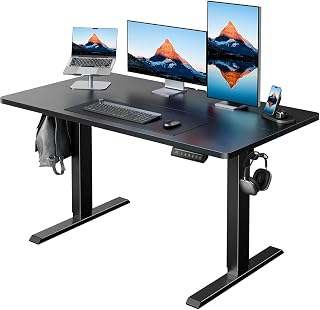
This model pairs a 176-lb capacity with four memory presets and added convenience features like headphone hooks, making it a versatile option for concentration-focused spaces or mixed workstations. The desk height ranges from 28.3″ to 46.5″, supporting dynamic workflows. Best for users who want memory presets plus ergonomic enhancements. Caution: some assembly steps may require careful alignment to ensure smooth operation.
VIVO Black Magnetic 12 x 13 Inch Portable Laptop Desk

This compact, portable workstation attaches to flat steel surfaces using magnets, enabling a quick, no-drill setup for laptops or tablets. It folds away when not in use, ideal for small apartments, dorm rooms, or temporary workspaces. Best for users who need a lightweight, space-saving solution. Limitation: weight capacity is modest, suitable for laptops and light peripherals but not heavy equipment.
HUANUO 48″ Desk With Drawers

This desk combines generous desk space with two drawers for organizing essentials and an open cubicle for a keyboard and mice. It supports C-clamp mounting, allowing you to attach compatible monitor arms or mounts for an ergonomic setup. Best for users who want built-in storage and monitor mounting flexibility. Caution: drawers add weight and may reduce knee clearance if space is tight.
Buying Guide: Key Purchase Considerations
- Height range and adjustability: Choose desks with a comfortable minimum height and a maximum height that fits your torso length to avoid strain when switching between sitting and standing.
- Stability and frame quality: Look for heavy-duty steel frames and tested lift mechanisms. A sturdy desk reduces wobble during typing or when using multiple monitors.
- Memory presets: If you share your desk or frequently switch users, presets help you return to your preferred heights instantly.
- Storage and organization: Drawers or cubbies can reduce clutter and improve workflow. Consider space available under the desk for leg movement.
- Mobility and placement: For small spaces, portable or wall-mounted options can save room. For larger rooms, a full-size desk with a stable base often offers better ergonomics.
- Mounting options: If you plan to use monitor arms or mobile carts, check compatibility with C-clamp or grommet mounting and whether the desk supports wheels or casters.
- Noise and maintenance: Quieter motors help maintain focus. Check maintenance requirements and the motor’s durability for daily use.
Frequently Asked Questions
- What height should a standing desk be for me? A comfortable height typically places your elbows at about a 90-degree angle when typing, with monitors at eye level. Target a sit-stand range that accommodates your daily routine.
- Are memory presets worth it? Yes, if you frequently alternate between sitting and standing or share a desk. Presets save time and prevent height guesswork.
- Is a drawer-equipped desk better for organizing? Desks with drawers help declutter the workspace, but ensure they don’t reduce legroom or stability on uneven floors.
- Should I choose a portable or fixed desk? Portable or wall-mounted options save space for small rooms, while fixed desks offer greater stability and surface area for large setups.
- What should I check before buying a dual-monitor setup? Ensure the desk height and depth accommodate dual monitors, and verify the frame supports the weight of your monitors and mounting arms.
- Do I need a heavy-duty desk for heavy equipment? If your setup includes multiple large monitors, a desktop computer, and peripherals, prioritizing a desk with high load capacity and a rigid frame reduces wobble and fatigue.